> ## Documentation Index
> Fetch the complete documentation index at: https://authsome.ai/docs/llms.txt
> Use this file to discover all available pages before exploring further.
# GitHub
> Log in to GitHub from authsome with OAuth2 PKCE or the device code flow. Tokens are stored locally and refreshed automatically.
GitHub is a bundled OAuth2 provider in authsome. The default flow is browser-based PKCE; the device code flow is supported for headless setups. Tokens are stored in the local encrypted vault and refreshed transparently before expiry.
## At a glance
| | |
| ------------------------- | ------------------------------------------------------------------------------------------------------------------------------------------ |
| Provider name | `github` |
| Display name | GitHub |
| Auth type | OAuth2 |
| Default flow | `pkce` |
| Device code supported | Yes |
| DCR supported | No |
| Default scopes | `repo`, `read:user` |
| Proxy host | `api.github.com` |
| Env var (`access_token`) | `GITHUB_ACCESS_TOKEN` |
| Env var (`refresh_token`) | `GITHUB_REFRESH_TOKEN` |
| Provider docs | [docs.github.com/...](https://docs.github.com/en/authentication/keeping-your-account-and-data-secure/managing-your-personal-access-tokens) |
## Prerequisites
GitHub does not support Dynamic Client Registration, so you need to register an OAuth app once. This is a one-time setup per app, not per developer.
Visit [github.com/settings/developers](https://github.com/settings/developers).
The button sits at the top right of the OAuth Apps list.
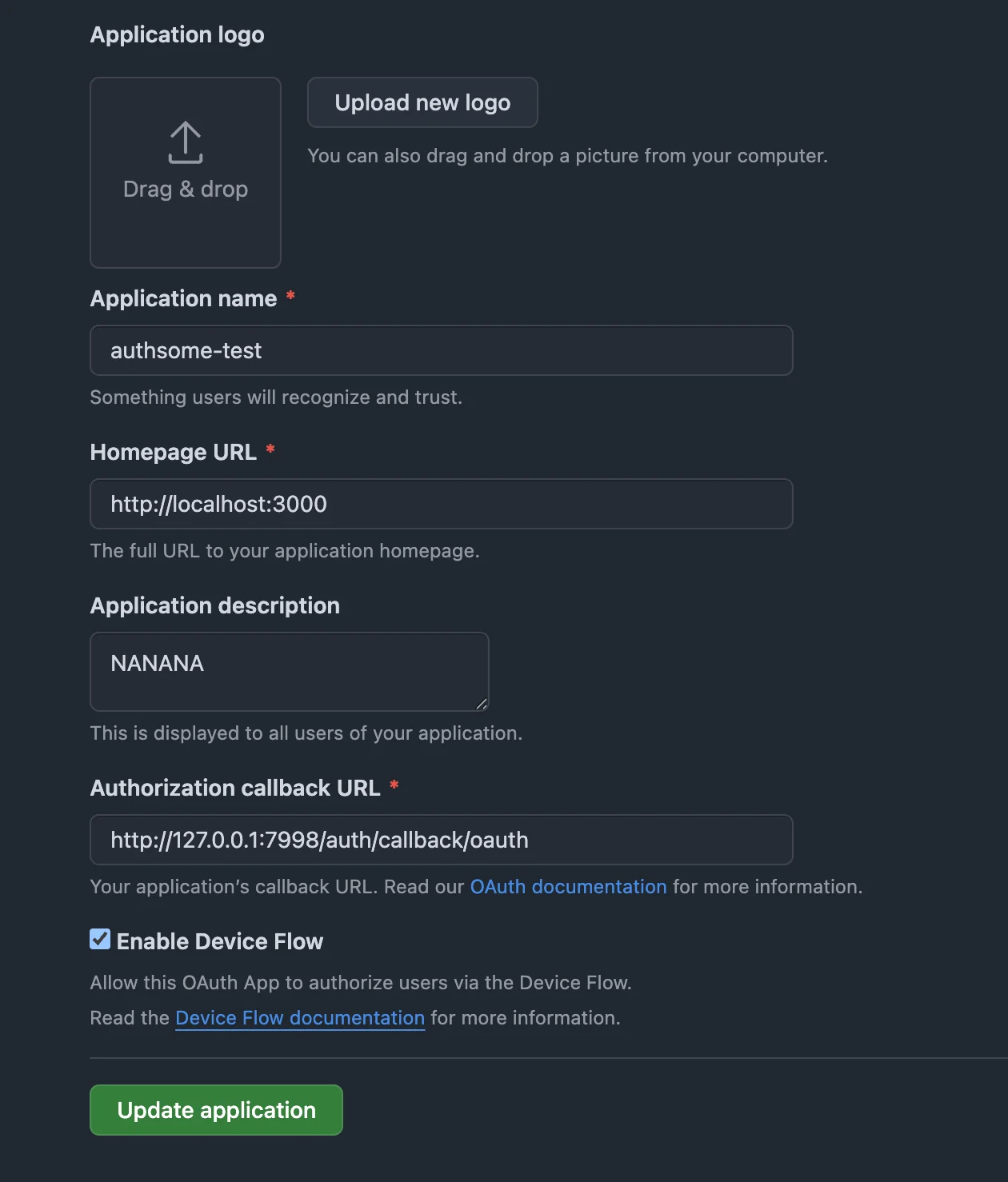
| Field | Value |
| -------------------------- | ------------------------------------------------------------------------------------------- |
| Application name | Anything memorable, e.g. `authsome (local)` |
| Homepage URL | `http://localhost:3000` (any URL works; GitHub doesn't validate it for OAuth functionality) |
| Application description | Optional |
| Authorization callback URL | `http://127.0.0.1:7998/auth/callback/oauth` |
| Enable Device Flow | ☑ check it on |
The **Authorization callback URL** must be exactly `http://127.0.0.1:7998/auth/callback/oauth`. Authsome's PKCE flow listens only on this address; any other value will fail with `redirect_uri_mismatch` at login time.
Click **Register application**.
GitHub now shows your new app's settings.
1. Copy the **Client ID**.
2. Click **Generate a new client secret** and copy the secret immediately.
Save the **Client Secret** somewhere safe (a password manager) before navigating away. GitHub shows the secret only once. If you lose it, you'll need to generate another one and update your authsome connection.
Authsome will prompt for both values on first login through a secure local browser form. You will not paste them into a terminal.
 ## Log in
```bash theme={null}
authsome login github
```
What happens:
Authsome opens a local form at `http://127.0.0.1:7998`. Paste the `client_id` and `client_secret`. They are encrypted and stored in your vault, then reused on every subsequent login.
A second browser window opens to `https://github.com/login/oauth/authorize`. Approve the requested scopes.
GitHub redirects to `http://127.0.0.1:7998/auth/callback/oauth` with an authorization code. Authsome exchanges it for an access token and stores the encrypted record.
The terminal prints `Successfully logged in to github (default).`
Verify:
```bash theme={null}
authsome get github --field status
# → connected
```
## Headless setup (SSH, CI)
For machines without a local browser, use the device code flow:
```bash theme={null}
authsome login github --flow device_code
```
Authsome prints a verification URL and a short user code. Open the URL on any device, enter the code, approve the app, and authsome's poll completes.
Device code uses GitHub's public OAuth client, so you can skip the OAuth app registration entirely for personal use. See [Headless setup](/guides/headless-device-code) for the full flow.
## Custom scopes
The bundled definition requests `repo` and `read:user`. Override at login time:
```bash theme={null}
authsome login github --scopes "repo,read:user,workflow,gist"
```
The granted scopes are stored on the connection and visible in `authsome get github`.
For the full list of GitHub OAuth scopes, see GitHub's [scopes documentation](https://docs.github.com/en/apps/oauth-apps/building-oauth-apps/scopes-for-oauth-apps).
## GitHub Enterprise
For self-hosted GitHub Enterprise, pass the base URL of your instance:
```bash theme={null}
authsome login github --base-url https://github.acme.com
```
The base URL is saved on the connection and reused for every token refresh. The bundled definition uses `{base_url}` placeholders for the authorization, token, and device code endpoints, so substitution is automatic.
## Multiple accounts
Personal and work GitHub on the same machine:
```bash theme={null}
authsome login github --connection personal
authsome login github --connection work
```
Read either side:
```bash theme={null}
authsome get github --connection work
authsome export github --connection personal --format env
```
Pass `--connection ` on `login` and on every read command to keep two or more accounts on the same provider side by side. See [Multiple connections per provider](/guides/multiple-connections) for the full pattern.
## Use the token
Run the agent under the proxy (recommended).
```bash Proxy (recommended) theme={null}
authsome run -- python my_agent.py
```
```bash Environment theme={null}
eval "$(authsome export github --format env)"
echo $GITHUB_ACCESS_TOKEN
```
Under the proxy, authsome sets `GITHUB_ACCESS_TOKEN=authsome-proxy-managed` in the child's environment and injects the real token into outbound requests to `api.github.com`. The child process never sees the actual value. Refresh tokens are never exported.
## Override the bundled definition
To change scopes or point at GitHub Enterprise by default, drop a custom JSON at `~/.authsome/providers/github.json`. The user-registered file always wins over the bundled one.
```bash theme={null}
authsome inspect github > ~/.authsome/providers/github.json
# edit scopes, base_url, or anything else
authsome list # source now shows "custom" for github
```
## Troubleshooting
| Symptom | Likely cause | Fix |
| ------------------------------------------ | ----------------------------------------------------------------------- | ----------------------------------------------------------------------- |
| `redirect_uri_mismatch` at github.com | OAuth app callback URL is wrong | Set it to `http://127.0.0.1:7998/auth/callback/oauth` exactly. |
| Browser opens but the form is blank | Daemon not running or port held | `authsome doctor` and check that port 7998 is free. |
| `Bad credentials` after a successful login | Token revoked at GitHub | `authsome login github --force` to re-authenticate. |
| Refresh fails after long idle | GitHub access tokens do not expire by default; refresh is rarely needed | If the connection shows `expired`, run `authsome login github --force`. |
For deeper diagnostics, see [OAuth callbacks](/troubleshooting/oauth-callbacks) and [Token refresh](/troubleshooting/token-refresh).
## What's next
Inject the access token into outbound requests without exposing it.
Keep two or more accounts on the same provider side by side.
All bundled OAuth providers.
## Log in
```bash theme={null}
authsome login github
```
What happens:
Authsome opens a local form at `http://127.0.0.1:7998`. Paste the `client_id` and `client_secret`. They are encrypted and stored in your vault, then reused on every subsequent login.
A second browser window opens to `https://github.com/login/oauth/authorize`. Approve the requested scopes.
GitHub redirects to `http://127.0.0.1:7998/auth/callback/oauth` with an authorization code. Authsome exchanges it for an access token and stores the encrypted record.
The terminal prints `Successfully logged in to github (default).`
Verify:
```bash theme={null}
authsome get github --field status
# → connected
```
## Headless setup (SSH, CI)
For machines without a local browser, use the device code flow:
```bash theme={null}
authsome login github --flow device_code
```
Authsome prints a verification URL and a short user code. Open the URL on any device, enter the code, approve the app, and authsome's poll completes.
Device code uses GitHub's public OAuth client, so you can skip the OAuth app registration entirely for personal use. See [Headless setup](/guides/headless-device-code) for the full flow.
## Custom scopes
The bundled definition requests `repo` and `read:user`. Override at login time:
```bash theme={null}
authsome login github --scopes "repo,read:user,workflow,gist"
```
The granted scopes are stored on the connection and visible in `authsome get github`.
For the full list of GitHub OAuth scopes, see GitHub's [scopes documentation](https://docs.github.com/en/apps/oauth-apps/building-oauth-apps/scopes-for-oauth-apps).
## GitHub Enterprise
For self-hosted GitHub Enterprise, pass the base URL of your instance:
```bash theme={null}
authsome login github --base-url https://github.acme.com
```
The base URL is saved on the connection and reused for every token refresh. The bundled definition uses `{base_url}` placeholders for the authorization, token, and device code endpoints, so substitution is automatic.
## Multiple accounts
Personal and work GitHub on the same machine:
```bash theme={null}
authsome login github --connection personal
authsome login github --connection work
```
Read either side:
```bash theme={null}
authsome get github --connection work
authsome export github --connection personal --format env
```
Pass `--connection ` on `login` and on every read command to keep two or more accounts on the same provider side by side. See [Multiple connections per provider](/guides/multiple-connections) for the full pattern.
## Use the token
Run the agent under the proxy (recommended).
```bash Proxy (recommended) theme={null}
authsome run -- python my_agent.py
```
```bash Environment theme={null}
eval "$(authsome export github --format env)"
echo $GITHUB_ACCESS_TOKEN
```
Under the proxy, authsome sets `GITHUB_ACCESS_TOKEN=authsome-proxy-managed` in the child's environment and injects the real token into outbound requests to `api.github.com`. The child process never sees the actual value. Refresh tokens are never exported.
## Override the bundled definition
To change scopes or point at GitHub Enterprise by default, drop a custom JSON at `~/.authsome/providers/github.json`. The user-registered file always wins over the bundled one.
```bash theme={null}
authsome inspect github > ~/.authsome/providers/github.json
# edit scopes, base_url, or anything else
authsome list # source now shows "custom" for github
```
## Troubleshooting
| Symptom | Likely cause | Fix |
| ------------------------------------------ | ----------------------------------------------------------------------- | ----------------------------------------------------------------------- |
| `redirect_uri_mismatch` at github.com | OAuth app callback URL is wrong | Set it to `http://127.0.0.1:7998/auth/callback/oauth` exactly. |
| Browser opens but the form is blank | Daemon not running or port held | `authsome doctor` and check that port 7998 is free. |
| `Bad credentials` after a successful login | Token revoked at GitHub | `authsome login github --force` to re-authenticate. |
| Refresh fails after long idle | GitHub access tokens do not expire by default; refresh is rarely needed | If the connection shows `expired`, run `authsome login github --force`. |
For deeper diagnostics, see [OAuth callbacks](/troubleshooting/oauth-callbacks) and [Token refresh](/troubleshooting/token-refresh).
## What's next
Inject the access token into outbound requests without exposing it.
Keep two or more accounts on the same provider side by side.
All bundled OAuth providers.